
App Base
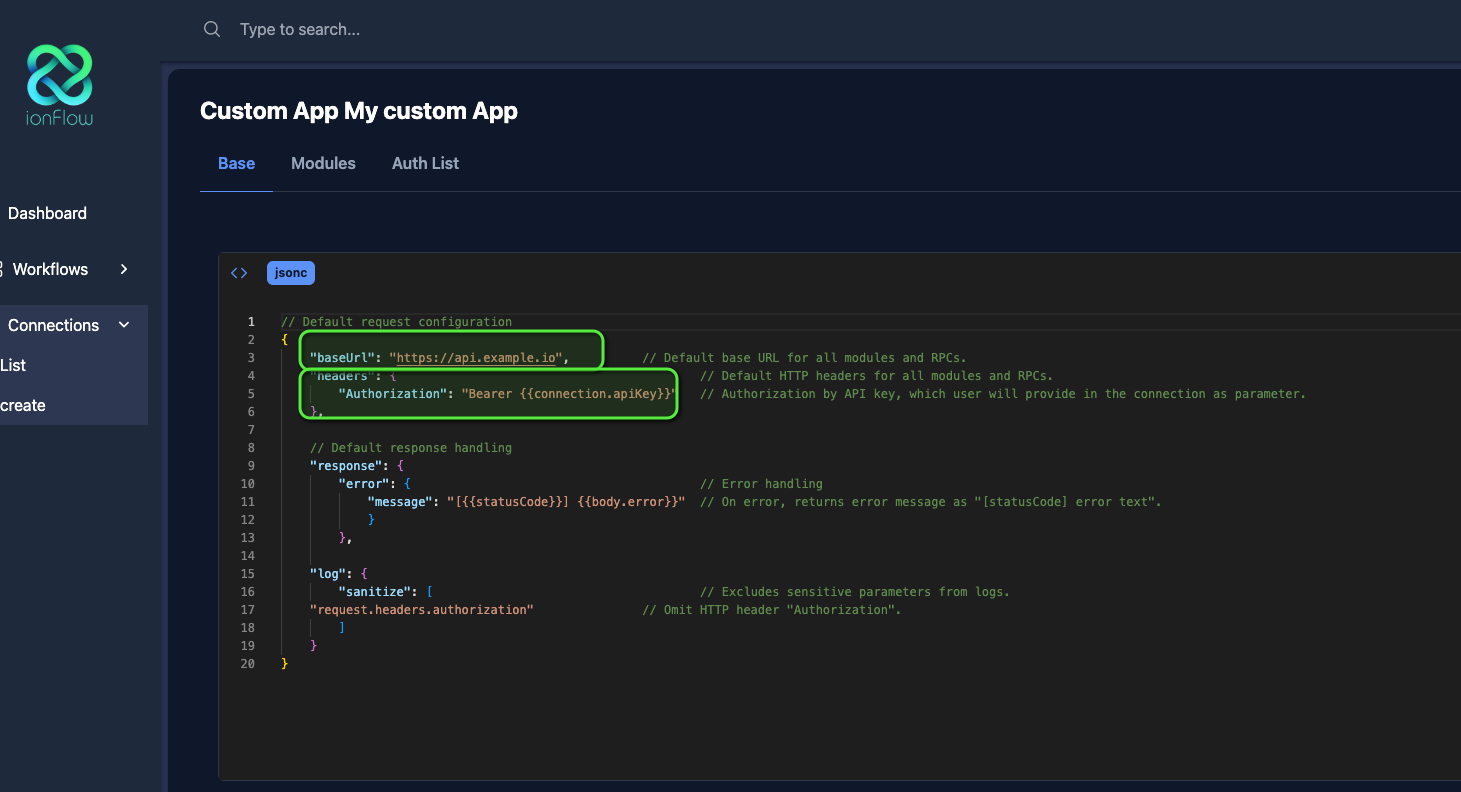
There are two very important parameters to configure:
-
“baseUrl”: It is vital to configure the common base that your application uses for all actions (such as orders, products, etc.)
-
“headers”: Here we can configure extra parameters that can go in each request to your application, such as the authentication token. In this example case, we are using the connection apiKey (“connection.apiKey” which we will see later) which will reference that parameter once the user configures their connection.
-
“qs”: Query strings are parameters that are added to the request URL. It’s not necessary, but the nomenclature, like headers, is to put them in a key and its value. This will be automatically configured at the end of the URL.
It’s important to mention that to bind references to connection parameters, it must be done in a text string (in double quotes) followed by where you want the reference, for example:
"qs": { "apiKey": "{{connection.apiKey}}"}If the user in their connection (which we will see in the Connections section) has the apiKey parameter after successfully authenticating, it will be replaced as follows:
The Connection:
{ "id": "123456789", "apiKey": "123456789-a"}"qs": { "apiKey": "123456789-a"}To finally be in the request URL:
https://api.example.com/v1/orders?apiKey=123456789-aIf you concatenate it for example with Bearer:
"headers": { "apiKey": "Bearer {{connection.apiKey}}"}The result will be:
"headers": { "apiKey": "Bearer 123456789-a"}