
Basic Concepts
The IONFLOW Specification is a set of parameters used to configure forms where they are required.
In the case of flows, many of them require parameters in the nodes that must be necessarily configured by the user (if they are required).
The common way to define them is as follows:
{ "type": <structure_type>, "spec": [ { "name": <parameter_name>, "type": <parameter_type>, "label": <parameter_label>, "required": <true|false>, "default": <default_value> } ]}Types (type)
Section titled “Types (type)”They define how the internal structure is going forward, there are for example: collection, array, string, number, boolean, date.
Collection
Section titled “Collection”This structure is for defining a form where a set of fields is required, in this case, it requires a string type field called “name” and another number type field called “age”.
To define a list of data, it must be followed by a spec, mentioning what type of data will be stored in this list, for example:
{ "type": "array", "items": { "type": "string" }}This will reference an array of strings.
For example:
["apple", "orange", "grape"]String
Section titled “String”The information to be stored in this field will be of type string, an alphanumeric text string.
{ "type": "string"}Number
Section titled “Number”The information to be stored in this field will be of type number, a number, decimals, or integers.
{ "type": "number"}Boolean
Section titled “Boolean”The information to be stored in this field will be of type boolean, a boolean, true or false, in the form it will be displayed as a checkbox.
{ "type": "boolean"}Specification (spec)
Section titled “Specification (spec)”In the case that the structure is of type “collection”, the content of this key will contain in a list all the fields that will exist in this collection of fields.
For example, if we have the following structure:
{ "type": "collection", "spec": [ { "name": "page", "type": "text", "label": "Page", "required": true }, { "name": "rows", "type": "text", "label": "Rows", "required": true }, { "name": "include", "type": "text", "label": "Include", "required": true }, { "name": "select", "type": "text", "label": "Select", "options": [ { "label": "All", "value": "all" }, { "label": "Selected", "value": "selected" } ] } ]}This will reference a form that will require a string type field called “name” and another number type field called “age”.
The form will be displayed as follows:
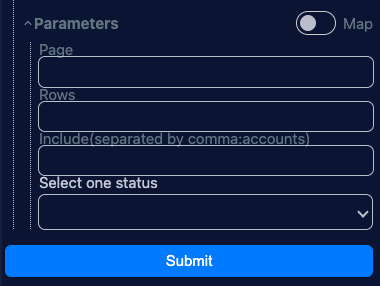
The result will be:
{ "page": "123456789", "rows": "123456789", "include": "123456789", "select": "123456789"}Depending on what the user enters.
Name (name)
Section titled “Name (name)”Defines the unique reference key in the form, receives only a string.
Label (label)
Section titled “Label (label)”It is a human-readable description that helps the user understand more details about what this field is about.
Required (required)
Section titled “Required (required)”Normally fields are optional, but if the field is required, it should be set to true.
Default Value (default)
Section titled “Default Value (default)”Defines the default value that will be shown in the form if the user does not enter anything.
Options (options)
Section titled “Options (options)”In the case that the field is of type select, a list of options must be provided. In the case that the field is of type multiselect, a list of objects must be provided with the following keys:
- label: is the description that will be shown in the select
- value: is the value that will be shown in the select